

Analyzing keyword difficulty is an important phase of the keyword research stage. And if you’ve read any of my other SEO articles, followed me on social media, or spoken to me about your SEO journey, then you no doubt have heard me say a time or two that keyword research is one of the first steps of a successful SEO campaign.
What is a keyword?
But let’s start at the beginning in case you’re new to SEO (search engine optimisation). A keyword is a word or phrase a user would type into a search engine to find a business like yours.
Through research, you (or me) can find keywords that would be an ideal fit for your business.
As part of keyword research, we need to look at and understand the difficulty of ranking for a particular keyword.
Every keyword is different. Some are extremely difficult to rank for, as there is a lot of competition, while others are easier, with lower levels of competition.
In this article, I’ll show you how to measure keyword difficulty.
Here are some thought points to get you started:
What is keyword difficulty?
It’s an important factor or metric used in SEO to determine the difficulty of ranking for a particular keyword or phrase in search engine results pages (SERPs).
Keyword difficulty takes into account various factors:
- the number and quality of websites that rank for that keyword
- the level of competition in the industry
- the strength of the websites that rank for that keyword.
In general, the higher the keyword difficulty score, the harder it will be to rank for that keyword, and the more effort and resources will be required to achieve a high ranking.
I always say knowledge is power and understanding keyword difficulty will give you the right knowledge so you can develop a Keyword Strategy that’s right for your business and is an essential and powerful part of an effective SEO strategy.

How do I check keyword difficulty?
There’s many ways to do this, but the most powerful way is with SEO tools. Like anything, there are free and paid options and then different levels again.
Paid SEO tools generally produce better and more in-depth results, but if you’re just starting out, use a free one and don’t get too bogged down in getting in right from the start. I always say action and progress are better than not moving forward. I just need to take my own advice on that sometimes.
But some great premium tools to start with that usually have some free options are:
- SEMrush
- Moz
- Ahrefs
- Ubbersuggest
- Serpstat
Otherwise, check out:
- Keyword Shitter – not kidding you with that name
- Keywords Everywhere
With all the SEO tools, the type of results you receive will differ, and you may find that the same metrics are slightly different from tool to tool.
My advice is to look at and play with each of them and run with the platform you like, whether that be results or layout.
SEO Browser Extensions
There are also a couple (that I know of and use) of Chrome extensions that can be useful, too, especially when trying to understand keyword difficulty. And they have free options, which is always a bonus.
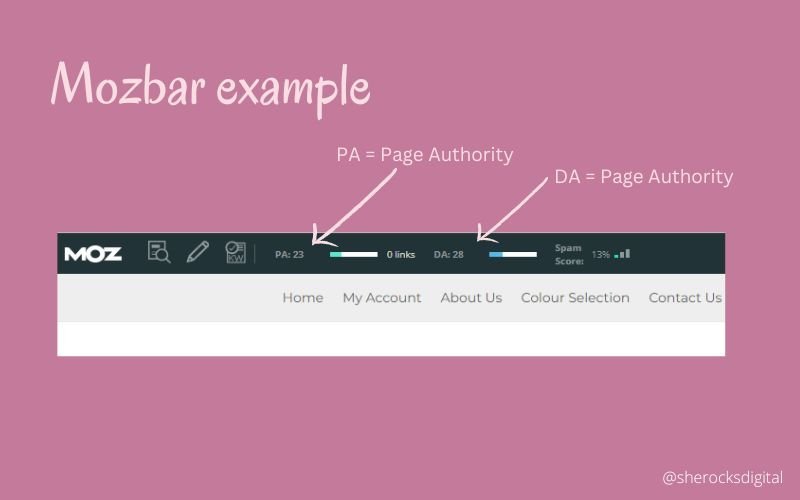
Mozbar
You receive instant metrics and data from Domain Authority (DA) and Page Authority (PA), review and access link metrics, check out if they have no-follow and follow links, as well as some other interesting data.
You will need MozBar Premium to access keyword difficulty, though.
SEOQuake
SEOQuake isn’t so much related to keyword difficulty specifically but has some great SEO features that I love:
- Keyword density – great to spy on your competitors to see what they’re using
- A quick overview of page info from page titles, meta description, whether links are follow or no-follow
- Whether the use of headings are being utilised and what they are
- Areas of site compliance – whether there is a site map, Google Analytics, and so much more
Page Authority
It is all about how much trust and value search engines assign to your individual pages. The higher the number, the more authority a page has.
The goal is for your website pages to have a high Page Authority, which works with Domain Authority and will help you take over your competitors.
MozBar and SEOQuake, which I talk about above, give you some insight into this.
Domain Authority
It is about the value of your domain as a whole and not just at the page level.
Growing your backlinks will help you grow your Domain Authority. As with Page Authority, you want a high number. But it’s all about growing quality backlinks, too. As a rule of thumb, the harder it is to get your backlinks, the better quality they are.
Backlink Checker
Backlinks are an important part of any SEO strategy. Knowing how strong a competitor’s website is will help you determine how difficult it will be to overtake them in the SERPs.
Moz Link Explorer
Is a great option with some great data:
- Domain Authority
- Number of linking Domains – including new and lost
- Inbound links
- Ranking keywords – which includes keyword difficulty and monthly search volume
SEMrush
- Number of referring domains – including new and lost
- Number of backlinks
- Monthly visits
- Organic traffic volume
- Outbound Domain numbers
- Authority Score
And a few more handy stats and metrics to be across or aware of, too.
What’s next with your keyword difficulty journey
Now it’s time to consider whether this is something you want to take on. If so, you need to:
- Pick an SEO tool
- Craft a list of what you think you should be ranking for – sometimes, this differs from what you end up targeting, but it’s a great starting point. If you have Google Search Console, then have a peek to see what words you’ve found for so far.
- Get researching and collating the data
- Review your Domain Authority and backlinks – both yours and your competitors
- Analysis it all and craft an SEO Strategy that will have you soaring up the SERPs.



0 Comments